

Description
Download Wilogio Words – Learn Russian Vocabulary with AI-Powered Methodology
Overview
Wilogio Words is a desktop application designed to enhance vocabulary acquisition, particularly for learners of the Russian language. The software leverages adaptive learning principles to tailor the study experience to individual users. By analyzing user behavior, memory patterns, and performance on exercises, the app dynamically adjusts its teaching methodology to suit each learner’s unique needs. This personalized approach aims to optimize retention and reduce the likelihood of forgetting newly acquired words.
Target users include language learners at various proficiency levels, from beginners to intermediate students seeking to expand their Russian vocabulary. The app is especially beneficial for those who prefer structured, self-paced learning with consistent reinforcement. Real-world usage scenarios include daily language study, exam preparation, and long-term vocabulary building. The software operates as a standalone desktop application, allowing users to practice without relying on internet connectivity after initial setup.
The developer, Wilogio, has positioned the app as a tool focused on intelligent learning strategies. While specific company background details are not provided, the emphasis on adaptive learning and memory retention suggests a strong focus on educational technology. The app’s design encourages regular engagement through scheduled review prompts and visual feedback, making it suitable for both casual and dedicated learners.
Key Features & Capabilities
- Adaptive Learning Engine – The app studies user habits, memory performance, and error patterns to customize the teaching approach for each individual. It identifies difficult words and adjusts lesson plans accordingly.
- Personalized Lesson Plans – Based on real-time analysis of mistakes and learning gaps, the software generates targeted exercises to reinforce challenging vocabulary.
- Memory Retention System – Built-in controls offer periodic review exercises to ensure long-term retention of learned words, preventing knowledge decay.
- Intelligent Assistant – An in-app assistant monitors learning progress, provides feedback, and alerts users if they are rushing or losing focus.
- Interactive Exercises – Learning is supported through simple, engaging tasks enhanced by visual aids and contextual examples for better comprehension.
- Customizable Workload – Users can adjust the intensity of daily practice, choosing between gradual, low-effort sessions or more intensive, faster-paced learning.
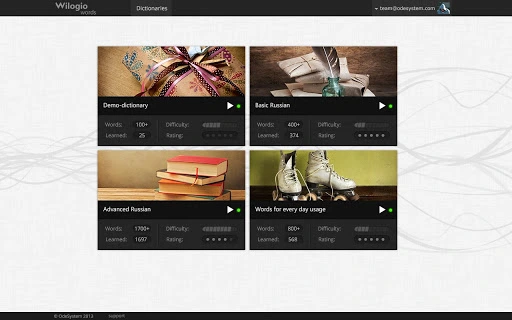
- Progress Tracking – Visual indicators on dictionary covers show repetition status, helping users stay on track with their study schedule.
These features collectively create a responsive learning environment where the app evolves with the user. For example, if a learner consistently struggles with verb conjugations, the system may prioritize related exercises and provide additional examples. Similarly, if a user tends to skip reviews, the assistant may issue reminders to maintain consistency. The integration of colorful visuals and interactive tasks makes the process more enjoyable and effective.
User Interface, Workflow & Performance
The user interface of Wilogio Words appears to be designed with simplicity and usability in mind. Navigation is likely structured around core functions such as vocabulary review, exercise completion, and progress tracking. The layout probably centers on a clean dashboard that displays upcoming tasks, recent performance, and learning milestones. Interaction with the app is expected to be intuitive, minimizing the learning curve for new users.
Workflow efficiency is enhanced by automated reminders and visual cues that guide users through their daily practice. The app likely uses a repetitive review cycle based on spaced repetition principles, ensuring that words are revisited at optimal intervals. While exact performance metrics are not specified, the application’s lightweight size of 25 MB suggests efficient resource usage, making it suitable for systems with moderate specifications.
The developer did not specify resource usage details. Performance observations are based on general software behavior patterns. Stability during extended use is expected, given the app’s focus on consistent learning habits. Users should experience minimal lag or crashes during normal operation. The desktop nature of the software implies reliable performance without dependency on external servers or internet connectivity for core functions.
Compatibility & System Requirements
Wilogio Words is available for both Windows and Mac operating systems. The software version is 1.0.0, with a file size of 25 MB, indicating a lightweight installation. This compact footprint suggests compatibility with a wide range of devices, including those with limited storage capacity.
Exact system requirements were not listed. Compatibility information was partially provided. The developer did not provide additional system requirements. Users should ensure their system meets basic desktop software standards, such as a modern processor, sufficient RAM, and a stable operating system version. Installation is straightforward, and the app can be launched immediately after setup.
Pros and Cons
Pros
- Adaptive learning tailored to individual memory patterns
- Personalized lesson plans based on user performance
- Intelligent assistant for real-time feedback and guidance
- Engaging exercises with visual and contextual support
- Customizable practice intensity for flexible learning
- Visual progress tracking and repetition indicators
- Free to download and use with no upfront cost
Cons
- No detailed information on system requirements
- Exact performance data not provided
- Limited availability of user reviews or third-party evaluations
- Learning effectiveness may vary based on user consistency
- Focus is currently on Russian vocabulary only
FAQ Section
Is Wilogio Words compatible with Windows and Mac?
Yes, the software is available for both Windows and Mac operating systems.
Is the app safe to download and use?
Wilogio Words is a desktop application developed by Wilogio. It does not require third-party permissions and operates locally on your device. As with any software, it is recommended to download from official sources to ensure integrity.
Does the app require an internet connection?
The app functions primarily offline after installation. Some features may require connectivity for updates or syncing, but core learning activities do not depend on constant internet access.
How often are updates released?
Version 1.0.0 was released on April 10, 2024. The frequency of future updates is not specified by the developer.
What type of license does Wilogio Words use?
The software is available for free, with no subscription or in-app purchase requirements mentioned. The exact licensing model is not detailed in the provided information.
Final Thoughts + CTA
Wilogio Words presents a thoughtful approach to vocabulary acquisition, combining adaptive learning with user-centric design. Its ability to customize the learning path based on individual performance makes it a promising tool for anyone serious about mastering Russian. The intelligent assistant, visual exercises, and structured review system work together to promote consistent engagement and long-term retention.
While detailed technical specifications and performance benchmarks are not available, the app’s lightweight nature and focus on usability suggest it will run smoothly on most modern desktop systems. The free pricing model enhances accessibility, making it an attractive option for students, language enthusiasts, and educators alike.
For learners who value personalized, efficient, and enjoyable vocabulary building, Wilogio Words offers a compelling solution. Its adaptive engine and smart feedback mechanisms set it apart from static flashcard tools.
Download Wilogio Words now
Guides & Tutorials for Wilogio Words App for Chrome
How to install Wilogio Words App for Chrome
- Click the Preview / Download button above.
- Once redirected, accept the terms and click Install.
- Wait for the Wilogio Words App for Chrome download to finish on your device.
How to use Wilogio Words App for Chrome
This software is primarily used for its core features described above. Open the app after installation to explore its capabilities.
User Reviews for Wilogio Words App for Chrome 0
No reviews found





